
Showing posts with label Tips. Show all posts

20 May 2009

Sports Photography Tips and Techniques


Victory in sports is about practice and performance - the best athletes prepare better than anyone else, training their bodies and minds to perform when winning and losing matter most.

It's no different with sports photography. Those one-of-a-kind photos you see don't happen by accident, or just because the photographer was in "the right place, at the right time."

If you're serious about sports photography, then you need to do more than show up a sporting event with a camera. You might luck into a nice photo people will compliment you on, but if you take these tips to heart, you can rest assured you'll take great photo after great photo.

Know your sport.

I mean that literally. If you are going to photograph a sporting event, you have to understand the strategy well enough that you consider it your sport. That doesn't mean you have to play it or even know all the rules, but you must know what the point of the game is, as well as what is considered excellent performance.

For example, in ice hockey, a player on the offense who is near the goal will sometimes pass the puck away from the goal and into what is seemingly empty space. To someone unfamiliar with the sport, it looks as if that's a mistake. But in reality the player is passing to empty space knowing that his teammate is going to time his skate to meet the pass, and take a shot on goal. It all happens in the blink of an eye, but if you have your camera trained on the momentarily "empty" space, you have a good chance of catching the instant the player strikes the puck with his stick. Or you could focus on the goalie knowing that a shot is coming.

Focus on the players that will give you the best photo.

A lot goes on during a game. There are a lot of great pictures that you'll probably miss. Focus on getting the best shot you can in any particular moment, and don't worry about the ones you missed. During a tennis match, take time to focus on one player's serve. Then, switch your attention to the other players return. Very quickly, you will find yourself becoming a part of the rhythm of the game. And once you reach that point, you'll see opportunities as appear.

While photographing a high school basketball game, I focused on the best player on each team. Now, I knew that other players would make great shots, but I also knew that teammates would look to both of these players. When the ball came to them, I took pictures. When they passed the ball, I took pictures. I avoided getting too distracted by other action. Both of these players went on to be stars in college, one of them played in the NBA, and I got some great shots that night.

Be prepared.

When those opportunities for the "money" shot do appear, don't get caught unprepared. I've known photographers who've forgotten to take their lens caps off and missed something great. Or, they may not have changed their ISO setting from the last time they used their camera. If you want to manually control the settings, then be sure to take your camera off automatic so the flash doesn't pop up when you least want it to.

Remember, you're not just there to watch the game. You're there to take a great photograph or two. Keep your camera in your hands, with a clean lens, the right lenses close at hand, and make sure your battery is fully charged.

Also, pay attention to weather conditions. Just because it's raining doesn't mean you can't take great photos. In fact, the drama may be increased by the presence of water on the field. If it's going to be a bright sunny day and your daughter's soccer game is at 7:30 on a Saturday morning, then you'll want to make sure you account for both the glare of the sun and the glint of dew that's sure to be on the fields.

Know your equipment. 

Of course, in order to be prepared, you need to know what your camera can and can't do. The last place you want to become familiar with your equipment is at the sporting event you paid $100 to get into, or at your daughter's TaeKwonDo National Championship competition. If you have relatives or friends who play on sports teams, ask if you can take pictures of their events. It will be good practice for you, and they will love to see the pictures you take.

If you don't already have a SLR camera with a telephoto lens, I recommend you get one. A point and shoot camera is good for portrait shots before and after the game, not fast moving action. And don't be too intimidated by SLRs or telephoto lenses. They behave much the same way as point and shoots do when you set them on fully automatic. But you gain a lot of flexibility that point and shoot cameras simply don't have.

Location, location, location and timing, timing, timing. 

These are the two most important things to keep in mind in sports photography, and they cannot be separated. You have to be in the right place at the right time in order to get a truly great sports photograph. And it doesn't have anything to do with luck. If your son's high school football team is marching down the field for a touchdown, then don't get so caught up in the game that you forget to rush to the back of the end zone. From there, you can get the perfect shot of a receiver catching a touchdown pass or a fullback barreling into the end zone.

Don't be shy about getting into position, either. I'm not recommending you sneak onto the sidelines during the Super Bowl and risk arrest. But at many events, if you ask politely and explain what you're doing, officials will let you on the sidelines. Also, you can check ahead to see if you can get a sideline pass. They aren't reserved solely for the media. It's good to check well before the event, but if you can't, try asking at the ticket office when you arrive. After all, the worst they can do is say no!

Sports stir the soul - for millions of fans, watching their favorite teams fight for victory, even if they end up in defeat, inspires them in their day-to-day lives. Your photos can have a similar impact.

Imagine a parent's delight when you present them with a picture of their child scoring a touchdown or goal ... imagine your lasting memories when you take a picture of your own child's moments of glory. It will affirm their dedication - and yours - and inspire you both for many years to come.

Matt Smolsky develops marketing programs and has written articles for a variety of clients, including Hoorray, a photo sharing website that offers a free online photo album to new members and is the easiest place to create a digital photo album, calendar, and other photo keepsakes.

PictureCorrect Comment: The Canon EF 400mm f/2.8 L IS USM Lens is probably the best track/field sports lens available. It is a super telephoto L-series lens with an Image Stabilizer that works great for all different kinds of sports situations.

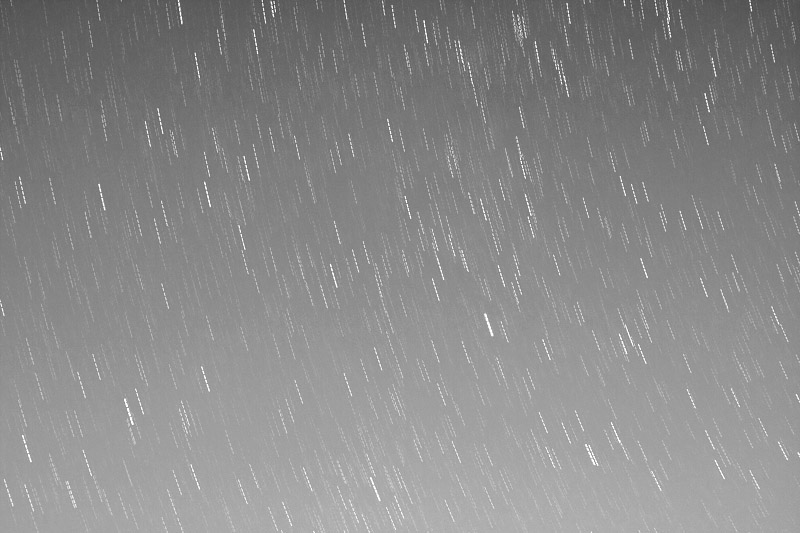
Tips for shooting star trails pictures

Trails (2008-10-19_ 40D_100-0746)
Picture by Antoine Khater

Introduction

Star trails photography is at the same time easy and rewarding, it can produce results that will leave most viewers in awe with very little effort.
I will try to cover in this article the basic photography technique and equipment needed for star trails photography.

Get away from the city

It is no secret that one should get away from the city to be able watch the stars, the same holds true for star photography.
Light pollution in the city is just to dense ! Head instead, for some remote camping siteor other unhabitated locations with a clear view for the sky.

Pick a starry night

Yea right ! I know it is obvious but still wanted to pin-point it! Also you might have a better visibility on a moonless night or when the moon is still low on the horizon.

What to Pack?

So let’s take a look at what you should take with you

  • Camera: Don’t go without it
  • Lens: You will need the fastest lens you have. Well pack 2 one long and one wide. I use a Canon EF 24-70mm f/2.8 (at 24mm) as my wide and an Canon EF 85mm f/1.8 as my long.
  • A few memory cards: Star trails is the type of photography when you’d expect to shoot a lot of pictures and keep only a few so make sure to have enough storage with you
  • A spare battery: Since we’re going to shoot long exposures you’d better have one or two freshly charged spare batteries with you. Specially that at night temperature goes down and batteries drain faster.
  • Remote shutter release:If you don’t have one you can always use your camera’s timer.
  • Camera cover: You’d probably need to protect your camera from dew and condensation.
  • Tripod: This one should rarely be left behind.
  • Flash light: Make sure to include on in you bag, you’ll need it not only to lighten you way.
  • Warm clothes & gloves: They might come in handy if it gets too cold.

Camera settings

  • ISO Settings: You will need to crack up your ISO settings at at least 800. Although it is very common to use ISO 1600 and 3200 for these shots it is a safe bet to start doing test at ISO 800 and check if there is a need to go higher
  • Noise reduction: If your camera has a noise reduction feature make sure to turn it off or else you’ll end up waiting for your camera to finish processing unable to shoot between every 2 pictures.
  • White Balance: Knowing that a star is a far away sun then, logically, the correctWhite Balance should be daylight. However this WB setting will generally lead to a very odd sky color, I’ve had much better results using Tungsten white balance.
  • Mirror lockup: To minimize camera movements to the max you will want to enable the mirror lockup and, if you don’t have a cable release, enable the timer on your camera.
  • Shoot Raw: RAW is much more flexible in editing afterward and specially effective for tweaking white balance settings.

Go wide and include a foreground

It is interesting to include an building/tree/rock or any other object or scene in the foreground. It gives a sense of familiarity to the viewer as seeing a normal scene in an incredible way.

Go long for abstract effect

Another option would be to compose your shot to include only stars. This will lead for a more abstract effect.

Get Creative with light

If you chose to go for a wide angle shot you can also use the flashlight to “light paint” the foreground. This will lead to have a nice foreground with details instead of only a black form.

Taking the shot

  • Secure you’re camera on the tripod
  • Pick your composition
  • Set your Camera to manual exposure and RAW
  • Set ISO speed 800, Aperture to the widest possible and shutter speed to 30 second
  • Enable mirror lockup
  • Don’t forget your white balance
  • Put your lens on Manual focus. If you have live view focus in that mode if not simply set your lens to focus at infinity.Be careful most lenses can focus past infinity you have to be sure focus is at infinity.
  • Put your remote release to continuous shooting mode, this will lead your camera to take repetitively shots of 30 seconds each keep noise minimal
  • If you don’t have a remote release, simply press the shutter button gently every 30 seconds and make sure you have your camera set to 2 seconds timer not 10 seconds
  • Keep warm and enjoy your night. Don’t forget to give light painting a try!

31 January 2009

Getting started with digital photography

Think you need a digital camera to have fun with digital photography? Think again. All you need is access to a computer and you’re ready to go.
Taking pictures
•There are several ways you can get pictures ready for a computer:
Scan existing prints and burn a CD
•Scan pictures that you’ve already taken. Whether you have a scanner at home or school, or have access to scanning services through a photo developer, getting favorite photos on a CD lets you quickly and easily copy these cherished memories to a computer for editing, printing, and sharing.
At the one-hour photo request a CD instead of prints
•When you take pictures with a film camera and take them to the one-hour photo for developing, have the pictures put on a CD instead of getting prints. This way you’ll still have access to all the benefits digital photography offers.
Use a digital camera There are lots of different types of digital cameras. Before you buy, make a list of the “must have” features to find the right one for you.

Top 10 digital myths

The early days of digital photography had some problems. Cameras were expensive. Photo quality was not good. There weren’t a lot of tools to handle digital photos.
Top 10 digital myths
Since then digital cameras have gotten a lot better. So have the photos they make. The tools available to manage photos have made digital easier than ever, too.

1. A digital photo is not as good as film. Today’s digital cameras produce great-looking photos, even in large print sizes. Film is good and improving, too. But digital easily keeps pace.
But there are still some people who have a negative view of digital photography. So here are the Top 10 myths…exposed:
2. Digital cameras are big and heavy. There are a lot of small, featherweight digital cameras that have loads of features. They create top-quality photos, too.
3. Digital cameras are slow. For a long time, digital cameras were slower than their film cousins. Every year, digital cameras get faster.
Digital photography guide
© 2008 Adobe Systems Incorporated Introduction to digital photography 3
4. Digital photography is expensive. Digital keeps getting cheaper. Someday soon it won’t cost any more than film.
5. It takes too long to transfer pictures to a computer. Get a USB or FireWire memory card reader to make quick transfers. The fastest card readers can copy three or four high-resolution JPEG photos to the computer in one second.
6. It’s hard to view and edit digital photos. Not any more. For example, Adobe Photoshop Elements 7 is available for less than US$100 — and it's surprisingly easy to learn and use.
7. It’s hard to make prints from digital photos. Printing digital photos is easy. You can print at home, or on the Internet using an online photo service.
8. Prints from digital photos look bad. It is almost impossible to tell the difference between digital prints and traditional film prints.
9. It’s hard to organize and store digital photos. Adobe Photoshop Elements 5.0 software lets you organize photos by category: family, friends, school, vacations, and pets. Protect your original photo files — also called digital negatives — by burning a CD and listing its contents on the disk.
10. Digital photography is too much fun. Sorry…this one’s true!

22 December 2008

7 Tips for Shooting Great Digital Photos

Do you have trouble shooting good digital photos? Perhaps you've been taking digital photos for some time, but never really got the beautiful shots you wanted.

Maybe you somehow messed up the photos you took of important events, like your daughter's birthday or your trip to Paris.

You can imagine the frustration one feels when photos of memorable events turn out ugly.


A shot of some beautiful flowers
 

So how do you begin to take good photos? Well, the first thing to remember is this: It's the photographer that takes great photos, not the camera. Think about that for a minute. It's true isn't it? I've seen some people take great photos with a simple point-and-shoot camera, while some take lousy shots with the most expensive SLR.

Fret not! Read these tips on shooting digital photos and apply them the next time you have a chance. Before long, you'll be shooting photos like a pro!
 

1. Know Your Camera

Does this sound familiar? You buy the latest digital camera out there, come home, rip off the box, then proceed to fiddle with the device. You briefly flick through the hundred page camera manual and then never look at it again. Not a good idea! If you buy a digital camera, you owe it to yourself to understand its ins and outs. Learn how to control exposure, how to use different camera modes and how to use the flash. The knowledge you gain about the camera will be invaluable when you're out in the field taking those special photos.
 

2. Learn to Control the Flash

One of the most important things you need to know about digital photography is to control the flash. Personally, I hate to rely on the automatic flash that comes with the digital camera. Depending on the situation, you need to switch off or switch on the flash.

For example, when taking outdoor photos, it is sometimes good to turn on the flash to illuminate the subject, especially if he or she is in the shade. On the other hand, you can also choose to turn off the flash when taking indoor shots. Sometimes, using the flash indoors will result in unnatural skin color and harsh glare in your photos.
 

3. Play with the Macro Mode

Almost all digital camera these days have a macro mode. This setting is ideal for taking close up shots of objects like flowers or insects. On my Canon PowerShot S500, it's represented by a flower symbol. What you do is to pick a subject, turn on macro mode, then get as close to it as your camera will allow. Make sure you allow the camera to focus properly before depressing the shutter button fully.
 

4. Hold the Camera Level

A basic rule of photography is to hold the camera level. Since most digital cameras come with a LCD, you can use it to properly frame your shots. Next time you're taking a shot, try to look for the horizontal lines and use them as guides. A good example is to make use of the horizon when you're taking a photo of a sunset.
 

5. Use The Tripod

I recommend this tip to all budding photographers - camera tripods are an essential tool in your photography arsenal. When will you need a tripod? Well, it's useful if you're taking shots under low-light conditions or trying to capture fast moving objects. I like to use a tripod when taking night shots city streets, for example. Always try to look for a tripod that's convenient to carry around. For personal use, you don't need a huge one - just a simple compact one that's easy to pack.
 

6. Play with the ISO Setting

I find the ISO setting in digital cameras very useful. The ISO setting of a essentially camera controls it's sensitivity to light. If you're taking a photo of a still object, like a flower, then always use a low ISO setting. It allows for a longer shutter speed and produces a cleaner image. If you're shooting a moving object, like a baby playing with a toy, then a higher ISO setting of say 400 would be better. Do take note, however, that a higher ISO setting gives a faster shutter speed and requires less light. This will produce noiser photos. 
 

7. Have Enough Memory Capacity

Just like you must have enough rolls of film when using traditional cameras, make sure you always have enough memory capacity in your digital camera. It's terrible to be on a holiday taking great photos and suddenly realizing you've no memory space left. Here are some general guidelines for digital camera storage.

  • 2 megapixel cameras - get at least a 64MB card
  • 3 megapixel camera - get at least a 128MB card
  • 4 megapixel camera - get at least a 256MB card
  • 5 megapixel camera and above - get at least a 512MB or 1GB card
     

Conclusion

Whew. A pretty long article. I hope I've managed to give you some good tips on shooting great digital photos. Always remember what I said - while the latest and greatest digital cameras have amazing features, you still need a skilled photographer to take nice pictures. Apply the above tips to your everyday shooting and learn to be a better photographer.

How to Buy A Digital Camera

Are you buying your first digital camera? Well, you must be confused by the bewildering range of models out there.

How do you know which model will suit your needs? To make things worse, digital cameras do not come cheap. Choosing a bad camera will easily cost you a few hundred dollars.

Let's explore some tips on choosing digital cameras in this article. Hopefully, it will help you choose the camera that's just right for you.


In fact, buying a digital camera need not be a difficult task. I'll highlight the key considerations you need to think through before making that purchase decision. Always, always remember to consider these factors when buying a digital camera:

  • Battery Life
  • Number of Megapixels
  • Zoom Lens
  • Exposure Control
  • User Controls
     

Battery Life

This has got to be one of the most overlooked features in digital cameras. I know many people who go for the latest and greatest digital cameras which are short in the battery life department. If you want to take good photos, your camera needs to powered for extended periods of time. I've found that cost and battery life don't go together - many cheap cameras have good battery life, while some high-end models drain your battery really fast. Make sure you choose a camera that has good battery life.
 

Number of Megapixels

The megapixel rating of a digital camera determines how much fine detail you can capture in your shots. Typically, the number of megapixels can range around from 2 megapixels to 8 megapixels. How do you decide how many megapixels you need? As a rule of thumb, if you're only interested in taking small snapshots to send via email or for posting on the Web, you won't need more than 2 megapixels. If you want large print outs of your gorgeous photographs, then you'll probably want to get 5 megapixel cameras and above. You may want to refer to this guide for more information.
 

Zoom Lens

You'll definitely want a camera with decent optical zoom. Now the keyword here is optical zoom (as opposed to digital zoom). Optical zoom physically moves the camera lenses to zoom in on a subject. Digital zoom, however, digitally averages and magnifies the image within the camera's microchip - resulting in poor picture quality. Many manufacturers' advertisements talk about digital zoom instead of optical zoom - so do be careful when choosing. I'd recommend getting at least 3x optical zoom in any camera you buy.
 

Exposure Control

The ability to control exposure settings such as shutter speed and lens opening is critical to professional photographers. Cheaper digital cameras only allow you to shoot photos in automatic mode - just press the shutter release and voila, your picture is taken. More advanced users prefer to tweak the shutter speed and aperture to capture fast moving objects or blur the image background. Choose a camera with good exposure control if you foresee yourself taking on photography as a serious hobby.
 

User Controls

If you are getting a point-and-shoot camera, make sure you find one that's easy to use. User controls to set resolution, macro mode, flash and exposure should be within easy reach. Of course, if you're a serious photography buff who wants to take the time to tweak all sorts of manual settings, then this many not be so critical. I prefer to try out the camera first in the store - play with the controls and get comfortable with them. Only then will you know whether it's comfortable enough for you.
 

Conclusion

Well, I do hope this article has helped you understand what factors to consider when buying a digital camera. A general piece of advice I can give is - if you're a total newbie, don't go for the latest digital SLR. It may be tempting to get that Nikon D70 right from the start, but I'd reckon its much better to start off with a cheaper camera first. Learn, experiment and build up your digital photography skills. Once you're more skilled, then proceed to upgrade to a better camera. Good luck and happy shopping!


Learn to Take Beautiful Photos

If you want to improve your digital photography skills, you may want to take a look at Digital Photography Success. This e-book package includes excellent step-by-step instructions on how to take pictures of beautiful landscapes, people, nature, fireworks, night scenes, etc. Learn how to shoot professional photos - just like those you see in glossy magazine covers.

19 December 2008

How To Take Good Pictures On A Mid Sunny Day?

Every one knows that sun light is terrible at noon, particularly on a sunny day and most of you feel that mid day is not appropriate and also terrible to take pictures.

But, in reality, instead of giving up taking picture in mid day, you can actually turn the situation to your advantage. Wondering how? Just follow these steps.

Seek shade

Most of you think shade will be much darker when compared with sunlight, but even shade will be quite bright on a sunny day. So, try to make use of it while taking pictures in mid day.

Use good filters

Filters can enhance your photographs in much better way. Polarizing filterhelps to increase the contrast between white clouds and blue sky. Additionally, it can take away the reflections from leaves and produces more saturated colors.

Use studio diffuser

Diffuse the excess lighting using studio diffuser, sheet stretched on a frame, which improves the color and softens the hard shadow along the edges of the photograph.

Increase the aperture

It would be much better to under expose your photo rather than over expose. So, switch your camera to manual mode and bump up the aperture to overcome extreme light.

4 Ways To Keep Your Photographs Safe and Backed Up.


fcsdfsdfsdf

Photo by chadh

The worst nightmare of a photographer worst than get his equipment stolen, it’s to lose his photographs. Being in digitized era the risks of losing you photographs and even documents, it’s higher than in the film era. There are a bunch of risks, from accidental deletion to hardware failure, file corruption and the list goes on.
Losing a photograph it’s worst than loosing something you created, which can be recreated the only thing you’re going to lose it’s time. But a photograph, you cannot go back in time and nail the exact same shot (I also consider that a photograph is unique, there aren’t two photos that loo the same even if there where shot at the same time).
So I will try to give you some advices on how to protect your precious photographs.

1. Always backup your photos on a DVD.

Every time you copy you photograph from your camera to your hard drive the first this you have to remember to do is to back  up onto a DVD or CD. There are so cheap compared to how much trouble can get you out from.

2. Use online services to archive and back up your data.

There are a lot of services that cand provide you with space to back up your photos.

Some have a price tag on the services:

And other are completely free:

  • Zapr - it oriented more on sharing, but putting the files to not be public it’s the way to go.
  • And a lot of other web-sites that are oriented on file sharing but you can easily use it as a backup space.

3. Create your own Backup Server.

Building yourself a back up server it’s very easy an very inexpensive. A backup server doesn’t need a monitor, mouse, keyboard, it’ doesn’t need to have fast an expensive processor, it doesn’t need to have a graphic card or more than 256 RAM, but it only need a good motherboard. You can built it from scrap parts (we all have some PC parts lying around) or find cheap one around the net. With less than 200$ you have  your own server. But you have to invest in hard drives. You can put on your new mother board (there are motherboard that can sustain up to 8 SATA-II drives) up to 8 1TB hard drives. Each hard drive can cost you less than 100 dollars. Imagine yourself with 8000GB of space, almost 600 000 RAW photos of 15MB each and 2.7million 10megapixel JPEG photos. Impressive ha? But still hard drive can often fails so you can also (strongly recommended) set up aRAID system, which can mirror your files between you hard drives, meaning that every hard drive has twin which contains the exact files so if one fails you still have one (a lot of bad luck to fail both hard drives). Another cool thing is you can use it as storage as well, and you can install Linux on your system and set it up so you can access it over the Internet (FTP, web, etc).

4. Use spare hard drives.

You can use hard drives that lye around and back up photos on it, than store it somwhere safe and then never use it again. There are a lot of 100-200-300gb harddrives that are very inexpensive, somwhere near40-50$.

Notice: Something to consider is that keeping all the backed up data in the same place can be dangerous because a natural disaster of just a fire in your room can ruin all your data along with the backup. Always consider an online backup. My recomandation is FlickR.